Wednesday, March 11, 2009

iWeb fixins

Dear Cupertino,

I work on several blogs, this one, my own, etc. I love the ease of use and management that iWeb gives me when managing a blog, however, I have one complaint. When I change between themes, or if I want to rearrange, say, where my Google Ad is placed on every single one of my blog posts, I have to do this manually, page by page, until I get them all done. Can you possibly find a way in your heart to be able to say "Apply to All"? That would save me so much time.

Thanks!

Joel Esler

Tuesday, February 10, 2009

iPhone Music Store Gifting?

Dear Cupertino,


I'd love to be able to give iTunes gifts from my iPhone. We can do it from the iTunes Music Store via iTunes on our computers, so why not from the iPhone version of the iTunes Store?

All we would need in terms of UI would be a button below the current "Buy Now" one, or a different interaction - say, hold down the "Buy Now" button to gift that particular song, movie, or TV show (but not App Store apps) to any of your contacts on your contacts list.

Gifting on the iPhone wouldn't just be handy if we wanted to give someone a song that we liked, or a TV show, nay, gifting on the iPhone would also come in handy if we needed to give someone a gift for their birthday at the last minute, or while we're out and about and can't find the perfect gift in a brick-and-mortar (that's a real store, folks, as opposed to an online store).

Gifting on the iPhone would also benefit those who don't usually have an internet connection at home, too. With the iTunes Store on the iPhone now available on cellular data networks, those sans-internet would be able to gift from the comfort of their homes, all without having to put on "real" clothes and go outside (shudder).

So yeah - iPhone Music Store gifting. Pretty please?

Thanks,
Pia Francisco.

Comments below, folks - and as usual, all DearCupertino wishes/improvements can be directed to:
joel [dot] esler [at] me [dot] com

Tuesday, December 30, 2008

iPod Touch and iPhone with Hard Drives

Dear Cupertino,

I was thinking about this one with a few friends. How about giving us an iPod Touch, or even better an iPhone with a hard drive. It could use a flash drive only for the operating system and apps so it doesn't seem slow.  Your music, movies, and photos would all be stored onto the hard drive. Giving us a wonderful touchscreen device with the space of an iPod Classic.

Here's another thought. How about giving us the option of interchangeable SD card slot for the OS and apps. Now that my friends would be GOLD. 

Thanks and love always,

Ryan

Friday, December 26, 2008

Multiple Genii

First up, hope y'all had an awesome Christmas. Whatever you did, whatever presents you got, I hope you enjoyed your holiday. Anyways, it's back to work now with yet another Dear Cupertino post from yours truly. It's one that has been floating around for a while, so, enjoy!

As usual, if you've got any suggestions for any Apple products that you'd like to see, shoot off an email to Joel: joel.esler [at] me [dot] com is the one you want.

Dear Cupertino,


With iTunes 8, you gave us the Genius feature. It's an awesome feature that is actually, pretty cool. From the Apple website:
The new Genius feature in iTunes 8 creates the perfect playlist. Just select a song, click the Genius button, and iTunes generates a playlist of songs from your library that go great with it. You decide how many songs appear in your Genius playlist — 25, 50, or 100. Refresh your Genius playlist to get new results. Or save your Genius playlist so you always have it.
One thing that the Genius playlist of iTunes 8 lacks is creation of a Genius playlist from more than one source song. Sure, we like it when we can make a playlist based on songs that "go great with it", but what if we're looking for a more specific taste?
Having the ability to create a Genius playlist based off more than one song would be incredibly useful in this scenario.

I can't see why Apple wouldn't implement this - surely it wouldn't involve that much more code.

Thanks,
Benny Ling

Friday, December 19, 2008

Top Posting and Bottom Posting

Dear Cupertino,

Now, for those of you that know me, you will know that this is a huge pet peeve of mine.

Email clients that Top Post by default and have no way to bottom post in any setting. One of the biggest email clients Outlook, has this same problem, and it annoys me to all end. (I detail this annoyance here.)

Mail.app does this. You can't bottom post at all.

Top posting means, when you reply to an email, the email client puts your cursor at the top of the email above the Attribution line.

Bottom Posting means, when you reply to an email, the email client puts your cursor at the bottom of the email, above your signature block.

The reason that this annoys me, is because I try to be a good Net Citizen and bottom post. I bottom post because I feel that when you read an email thread you should be able to logically follow it. If you've ever tried to read an email thread that is posted in totally Top posting format, you will know that this makes email threads logically hard to read. I'd like the ability, in Mail.app, much like it is in Thunderbird, to make my default post method Bottom only.

Please?

Thanks,

Joel

Wednesday, December 17, 2008

Clear and Focused

Just a simple one today, folks. As per usual, if you've got any suggestions, or any thing that bugs you immensely about any Apple product, shoot a rant across to Joel at: joel.esler [at] me [dot] com, and he'll be more than glad to read it.

Dear Cupertino,

User Interface inconsistencies bug me. It is really annoying when the UI in any particular application don't function as you'd expect it to. This is particularly true when UI inconsistencies aren't the same across applications - even when said applications are built on the same set of APIs as one another.

For instance, the search field in the iTunes Music Store is on of those things that is just plain annoying.

The problem stems from the field not being able to "clear and focus" itself at the same time. If you've already got something typed in, and the field isn't currently focused (ie, doesn't have the blue highlighting around it), then you can't just hit the X next to your search term and start typing for another search - nope, you have to click in the field again so you can type in that field.


It's one of those UI inconsistencies that really get up my nose - and I want to see something done about it. Almost every other search field that implements the small X that clears the field and refocuses it so you can start typing it immediately seems to work right - so why not one of Apple's most widely distributed products, iTunes?

Apps that I have open at this moment which manage to do this right include: NetNewsWire and Chax's Log Viewer for iChat. Even Firefox's Google search in toolbar manages to automagically select the text for you when you click in the unfocused field, ready for you to start typing.

Everyone who has an iPod has iTunes (unless they're just plain disturbed), so it's one of those things that you would think Apple would go about fixing - this "clear and focus" functionality seems like a standard object in terms of coding Cocoa applications, but it's broken across the board in iTunes - neither the iTunes Music Store search field or the Music Library search field exhibit any "clear and focus" functionality at all. Poor effort, Apple.


Oh well, I guess I'll just have to wait for 8.0.3.

Thanks,
Benny Ling.

Ed's note: post idea from here. Props to Daring Fireball, Bjango, and the excellent range of ngmoco:) apps from the app store.

Friday, December 12, 2008

Wishes Fulfilled!

So even though this site is primarily about what we wish Apple would do, every once in a while it's nice to see some of our recommendations being implemented by the guys at Cupertino.

I'm sure that it wasn't entirely our fault that these features were implemented in products, but I'd like to think that Dear Cupertino has done it's fair share in influencing Jobs and the rest of the Cupertino crew to make these things happen.

It is with great pleasure that I can tell you that Apple is a company that listens to it's customers. Okay - so some of their decisions might not be as glamorous as we'd expect, (nor as popular), but at the end of the day - Steve is looking after you, the consumer.

Righto -- so it's great to see two wishes that have been made true;

  1. The Biggest Little iPod In The World
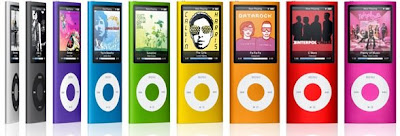
    Wow - the third generation Nano may have come and gone - and with it, the 4GB iteration of the above - but the fourth generation has now landed, complete with 16GB of juicy flash goodness, and in a whole heap of different colors, too!
    We love it - it's another great Apple product.


  2. iSights in the Monitors
    So we've now seen the arrival of the new 24" LED Cinema Display, and while some may not be a fan of it's glossy appearance, it's hard to deny the fact that it include an iSight in the monitor - that much is a given.
    However - we're yet to see some really-cool feature by Apple to make use of this second iSight - if you've got any suggestions for this second iSight, we'd love to hear them (just shoot off an email to joel.esler [at] me [dot] com).
If there are any other previous Dear Cupertino entries that I've missed but have now been given the green light by Apple, let me know in the comments.

Cheers,
Benny Ling.

Images courtesy Apple: iPod Nano, Cinema Display.

Wednesday, December 10, 2008

More Exchange Support in Mail, Please!

Posts are few and far between, and it's all your fault!
Get those submissions in, and hit Joel up at: joel [dot] esler [at] me [dot] com


Dear Cupertino,

I love Mail. I love the way it handles all my emails, and the fact that I can have a single inbox for all my email accounts. It's fantastic that it can handle Exchange mail servers in the first place - if it didn't, there would be a serious deficiency on Apple's part.


However - there is one flaw that I've recently encountered that can be easily fixed; Mail, in it's current iteration, can only support one Exchange inbox at a time. Just one, and not one more.

Of course, you can see where this would be massively frustrating - if you're at home and you and your partner have Exchange accounts on your company's server, then you're up the creek without a paddle. You then have to resort to using a third party program which does have multiple Exchange inbox support, or worse - use the ugly-as-sin Entourage 2008 client for Mac (which only supports Exchange if you buy the Standard edition, not Home and Student).

However hard I wonder why Apple hasn't built this into Mail, I can't quite seem to fathom why they have done so.

Anyways - I'd love to see this feature in 10.6 - kudos to Apple if they deliver the goods.

Thanks,
Benny Ling

Sunday, November 23, 2008

iWork Improvements

Righto - more and more suggestions! Keep em coming to joel [dot] esler [at] me [dot] com!

Dear Cupertino,


I love the simplicity of iWork. It's a great alternative to the Microsoft Office Suite for Mac, and, being an Apple product, you know that It Just Works. Creating fancy slideshows in Keynote is as easy as creating professional ones, and writing a letter or a resume in Pages is but one click away. Numbers, while not as fully-featured as Excel, makes spreadsheets easy for the uninitiated.

However, there are two things I'd like to see in the next iWork update:

  • The ability to copy and paste data into the graph data box in Pages.
    Why this isn't already a feature I don't quite understand, but graphs in Pages seem a lot harder to do than their Numbers counterparts. Unless I'm missing something profoundly simple, this just isn't possible with Pages graphs. Pages' graphs in general, are not intuitive, they're finnicky, and generally require a lot of messing around to work right.
  • One click line of best fit.
    Again, unless I'm missing something that's staring me in the face, I'm not quite sure why it's so hard to draw a line of best fit for the data given in a Numbers graph. Numbers is great in that it automatically shows us the sum, average, max/min values of any selected data, but seriously - why no line of best fit? This is another feature that should have come standard. I mean, sure, it can be done - but it should be easier than that, Apple.
That concludes my rather short list of iWork suggestions. If I've missed anything you'd like to see added, shout out in comments below.

Thanks,
Benny Ling.

Saturday, November 22, 2008

iPhone + iTunes: A perfect combination.

So we've been doing a couple of iPod and iTunes improvements, but what about the awesome iPhone and iTunes combination?

There are just a couple of suggestions we have in mind...

Dear Cupertino,
  • Folders for applications on the iPhone.
    Please, for those of us that are hitting your 144-apps barrier, we need these desperately! We'll not only be buying more apps from the App Store as a result, but also using our iPhones more if we can find these apps and store then in folders. Repeat app usage would also go up. I mean really, Apple. There are more than hundreds of useful apps on the App Store, and yet you limit us to only 144 of these?! Not to mention, the 9 page limit on home screens... needless to say, it's incredibly annoying to have to swipe through 9 pages of apps just to find that one you want...
  • Ability to arrange Apps on the iPhone from iTunes
    Now - I hate dragging around apps on my iPhone. When you have full home screens, dragging around apps is a pain in the proverbial - for example, dragging an app from home screen 4 to home screen 2 - with a full home screen 3 inbetween. An app then gets displaced from home screen 3 (as you can't drag over more than one home screen at a time), and then you have to waste time dragging the displaced app from home screen 4 back to home screen 3... Seriously, have I lost anyone yet?! See how complicated it is?!
    If we could only arange our apps from iTunes - dragging with a mouse is so much easier than dragging with your finger.
  • Some sort of interaction with iTunes when your iPhone is plugged in.
    Say you have your iPhone plugged in, and you get a text message. Instead of displaying that text message on the iPhone screen, iTunes would then pop up something on your Mac/Windows display saying that you've got a new message... Same goes for phone calls and so on.
There are a whole lot more fixes that we want - but they're far too numerous to list here. Leave a comment, though - any new material can be provided via Joel - shoot him an email at joel.esler[at]me.com with any ideas you have about Apple improvements, and we'll do our best to make something of it.

Oh Apple - one more thing. Where are my push notifications?!

Ah well, 2.3 it is, then...

Thanks,
Chris (with parts from Benny).

Thursday, November 20, 2008

What we'd like to see: iPod

Right, seeing as we've reached 50 posts with the day before yesterday's "iTunes Improvements, Part II", I thought I'd say how awesome you guys are.

Without you, there'd be no Dear Cupertino - so get those submissions in, guys! Email Joel at: joel.esler[at]me.com
Exams are finally finished now, and seeing as I've got a a bit of spare time, I thought I'd share the iPod love...

Dear Cupertino,


So we've heard that Apple might be making the MacBook Air out of carbon fiber, and we've also heard that Apple might be releasing iPhone OS 2.2 sometime within the next few days, but what about the unloved 17" MacBook Pro?

In any case, the iPod has gone through a number of revisions and is a solid product that doesn’t need many revisions. However, there are a couple of ways that the best portable media player on the market could be made even better...
  • A "Shuffle by Album" option on the iPhone and iPod Touch - would be great when we want to listen to different music from different albums, obviously.
  • The ability to browse by Album artist in the navigational menu.
  • Support for Cover Flow to sort by Album Artist, instead of just by Artist name.
  • Enable transcoding of Apple Lossless to 128kbps (or better) AAC on the iPod - which I think is currently enabled for the iPod Shuffle.
  • The ability to browse artists by the "Sort Artist" field tag (from the file's metadata) instead of the "Artist" tag, but only if it is set. This will help get rid of duplicates caused by featured artists or remixers entered into the Artist field.
  • 802.11n Wi-Fi. Wi-Fi of any sort would be desirable in any form, but seriously, Apple - if other nameless media players have it, why not on the iPod?

Thanks,
Ian Rawluk

Editor's note: Ian, you're a full-blown legend, mate! Thanks for all your submissions so far.
Image courtesy Apple.

Monday, November 17, 2008

Getting Back to Basics...

So as a follow up-post to iTunes Improvements, Part One, there was just a couple of interface-related things I might have missed...

Posts are few and far between these days, so keep those submissions coming! Shoot 'em over to joel.esler [at] me [dot] com, and the Dear Cupertino monkeys will hammer on their keyboards for a while and spit out good quality posts... Or meaningless gibberish, one of the two.


Dear Cupertino,

iTunes is awesome, but lately it has become bloated with features and now runs sluggishly as a result.

What happened to the original Apple design modus operandi of "less is more"? John Gruber, of Daring Fireball fame, has even said that: "Figure out the absolute least you need to do to implement the idea, do just that, and then polish the hell out of the experience" in regards to iPhone App design, but doesn't the same apply to most Apple apps?


One of the main reasons people like Apple is because things are so much easier to do - even if features are sacrificed for usability and/or aesthetics. Oh yeah, it's happened before - firewire anyone? Going back even further, floppy drives, anyone? The invention of ADC was practically so USB, power and display signal could all be done through the one cable - even if users didn't want these features.

To point you in the right direction again, I've compiled a list of iTunes interface improvements, as follows:
  • The ability to search lyrics and restrict your search to only the lyrics field.
  • Make the grouping tag work like it does on the iTunes Store. If you browse the Complete U2 collection that Apple advertised, you will see that the collection breaks down per disc with titles of each original U2 release in the set. You can then hide or reveal the tracks on each disc by clicking the arrow on the left side of the header. I would like to see something like this implemented in iTunes, especially for classical albums, which often contain multiple symphonies on a single disc.
  • Support for lyrics display on iTunes, not just on the iPod.
  • Multiple artist support in the browser pane.
  • Improved print layouts with album artist support.
Thanks,
Ian Rawluk.

Editors note: Now, these improvements are all well and good, but I personally don't think these are the improvements should be making to iTunes.
iTunes, being in it's 8th revision now, has simply become one of those apps which we can't live without - but at the expense of simplicity and aesthetics. Sure, the new grid view is "pretty cool", but is it really needed?
In this blogger's opinion, Apple needs to do what it did with OS9 and scrap it, and start from scratch. iTunes was originally a media player, and while the iTunes Store is a big part of that (5 billion songs can't be wrong) it needs to do what it does best - play music.
Lately, though, it just seems that iTunes isn't a music playing app, it's a spending-money app. All these Genius features are excellent in terms of music recommendations, but in reality they're just another way for Apple to get you to spend money at the iTunes Music Store.

Now, I can't blame Apple for trying to make money - they are a business, after all. However, it does bug me when these so called "features" are really thinly-veiled attempts to suck more money out of consumers. If I like a song, I'll look it up in the iTunes Store, preview it, and then buy it if I like it. That's what the iTunes store is for, and for that, it works beautifully.

I guess what I'm trying to say is that iTunes needs a massive overhaul - forget all the extras (5 visualizers, ooh!), and get back to basics, 'cos that's what Apple is all about.

Saturday, October 18, 2008

New Laptop Improvements...

Dear Cupertino,

I love the new laptops. An excellent design coupled with unparalleled tech specs give a refreshed product line that Just Works.

I'm also a huge fan of the new 24" LED Cinema Displays - it's obvious that the same Jonathan Ive magic that went into the new laptops went into the cinema display, too - and I'm nothing short of impressed.

As with any Apple product, though, there are a few things that need to be considered about the new portables...
  • Glossy-only displays. I don't understand this. Matte is an excellent choice for those requiring color accuracy. While the Mac market has been traditionally aimed at designers and those video/creative professionals, those that require definite colour accuracy now won't be looking at an Apple laptop, or even the new glossy-only LED Cinema Display. Sure, any serious designer worth their salt won't be using a Mac laptop as their main machine anyway - definitely not without a decent external monitor.
    While I can see why ordinary consumers would choose a glossy display over a matte one, I'd love to see comparisons on how many matte vs glossy MBP's were purchased. A good compromise on this would have been the option of a matte screen - even if the default was a glossy screen.
  • The removal of firewire from Macbooks - forcing consumers to buy the MBP if they want firewire. Yet another decision I don't understand. Truth be told, Apple is no stranger to the tried-and-true technique of deliberately cutting features from a product in order to get buyers to grab the next model up, (as we've all seen with the mysterious xMac, that Mac model in between the iMac and the Mac Pro) but seriously - it's alienating switchers. I lament the loss of firewire from the Macbooks as it was integral part of the "target disk mode" feature - one that is essential for recovering data if your OS doesn't boot, or you're having other issues. However - you can still do target disk mode via ethernet or wireless - but only within a GUI environment. Sucks if your OS is broken.
    This is one choice I don't understand, at least from a technological standpoint. A good alternative would be to at least offer firewire on the top level Macbook - even if you charged for it, I'd pay, and I'm sure those people that don't need the added bulk (and weight) of the 15" screen would as well.
    I'm sure people will say that firewire is going to way of the dodo (and disco), and that it's only a technology that creative professionals use, but in reality, aren't all Macs aimed at creative professionals?
    This is one feature drop that emphasises how dedicated Apple are to sacrifing features for usability.
  • No Blu-Ray. Now this one I do understand. As people have said, there are licensing issues to contend with even if Apple sits on the Blu-Ray board - so much DRM has been added to Vista as a result of support for Blu-Ray, and we just don't want that on our beloved OSX. Then there's also the issue of competition with iTunes HD movie rentals - as Apple don't want to cannibalise their own creations with third-party tech. I also understand how hard it is to find 9.5mm high Blu-Ray drives (let alone in bulk), given how uncommon "normal" 9.5mm DVD drives are...
    A good solution for this would be to offer Mac-compatible external Blu-Ray drives. Either that, or just stick one of these in every Macbook/Macbook Pro box.
  • Price. US consumers mightn't care so much about the price, but Australian and UK users definitely do. AU $2100 isn't the best price point for a laptop with the same specs as the new Macbooks. I mean, when you can buy not one, but TWO same-specced Dell XPS 1530s for the same price as one 15" Macbook Pro, then I'm not entirely sure where Apple are going with these prices. Sure, the Australian dollar isn't that flash hot at the moment, but when it was hovering around 93 US cents, Apple didn't lower the price. Slow to drop, fast to rise.
    As a sort of justification, the there's only 11-12% of a price rise over the US stores, and when you factor in that the Australian GST (Goods and Services Tax) is included in the Apple store prices, and the US online store is free of any such taxes, then it starts to seem like Australian and UK customers are getting a better deal - a completely new design, new specs, for about 1-2% more than the US price. All in all, not bad when you consider that the Australian dollar dropped through the floor...
I'll be following this post up with one that outlines the positives of the new laptops in serious depth - so check back often! If there's anything negative about the new laptops, sound off in comments.

Thanks,
Benny Ling

Friday, October 17, 2008

Command Tab Full Screen Apps

Dear Cupertino,


I love multi-tasking on my Mac. One hinderance to my productivity is not being able to switch between full-screen apps using Command+Tab, a keyboard shortcut that allows me to switch to another program without looking away from the screen.

I figure it's one of two things - either OSX doesn't allow for full-screen app switching, or the developers of said apps aren't building the Command+Tab functionality into their app. If the second option holds true, then Apple should make it a default - just like Option+Command+Esc is force quit for the active app when in full-screen mode.

Yeah - so I'm mainly talking about games here. Halo for Mac is excellent because it does allow full-screen app switching from within the app. Whether this is a specific feature the developers built in, or whether it's included in all Mac games by default, I don't know.

So - CrossOver Games, if you're listening, I'm looking at you.

Productivity, heh. So much for that.

Thanks,
Benny Ling

Thursday, October 9, 2008

iPhone HD

Dear Cupertino,

For those of us with large music/movie collections, how awesome would it be to have an iPhone or iPod Touch that has a small flash drive so the OS can run smoothly, but have a massive 80GB HD for all of our media. Yes please.

Thanks,

Ryan Stellato

Song Search


Dear Cupertino,


In iTunes you can search for a song, artist, etc. In Contacts on iPhone/iPod Touch you can search for your contacts. How come you cannot search for songs and artists on the touch devices. I know I've been in situations where someone has asked me if I had a certain song and I had to scroll through to find it. I would really enjoy searching for my music especially in playlists where there is no specific order.


It's short, but you know you want it too.


Thanks Love,


Ryan Stellato

Sunday, September 28, 2008

Please to add my own Widgets?


Dear Cupertino,

I've had this post marinating for awhile now, just haven't had a chance to write it up.

We have Stocks
We have Weather.

Why can't we add our own widgets to the iPhone interface? It's a little piece of code, we have the SDK for the iPhone, we know the criteria, why can't we create a little widget just to pull information from the internet without having to write an entire app to do it? Yes, there is a ton of apps to do what I want, but I don't want to pay for a widget I can create myself with DashCode. Can't I do that?

Thanks,
Dear Cupertino Reader

Friday, September 26, 2008

iTunes Improvements, Part One

Dear Cupertino,

I love iTunes, really I do. It's the one app that handles all my syncing to iPhone, AppleTV, iPod, (unlike some other mobile platforms we know) and on top of that, it manages my entire music collection at the same time! It's completly awesome.

However, I do agree with people who are saying that iTunes is becoming far too bloated (code wise), and feature wise - I've seen iTunes 8 gobble up lots of RAM due to it's new grid album art view. Some people say it's now trying to do too much - but damn, it does it excellently!

Anyway, here are a couple of things we'd like to see in the next version of iTunes...

In the Maintenance category, we have:
  1. Find songs without artwork - while iTunes sort of does this, it doesn't do it particularly well, often stumbling on tracks that have ID3 tags that differ from the iTunes Music Store tags. There are apps out there that do it (or pretend to, and screw everything up) but what we'd like to see is an Apple alternative. We love good quality album art, and the iTunes store provides.
  2. Find dead songs - OSX has a all-encompassing search tool called Spotlight, no? And metadata indexing? Why doesn't Apple combine to two in some way to let iTunes find your dead music, those tracks which aren't where they used to be.
  3. Rescan/normalize soundcheck and gapless values - for songs, this would be great as an option we could preform ourselves. This way, we'd have complete control when a song stuffed up our soundcheck values, or was playing with a gap. Rescanning it would then play the song, sans gap.
But wait, there's more! In the metadata section, we have the following suggestion:

iTunes is great for managing a large music library and I’m constantly using the search feature to find a song or album of interest. However, I think that the program needs to allow room for some new metadata fields:
  1. Ability to tag/label songs as clean or explicit. Currently, songs downloaded from the iTunes Store come with these labels but when you import your own music from CDs you own, the tracks come in sans clean/explicit labels. You also can't see the tags for existing media in your library, nor edit them. This would be nice for parents to be able to restrict the music younger children could access in the library. Adding this feature would become akin to adding stars to songs - instead, how about you give it a clean/explicit rating?
  2. Automatic lyrics import - iTunes already supports the addition of lyrics but this must be done manually on a per-song basis which can be annoying. There are many widgets and programs that automatically fetch lyrics for currently playing iTunes songs - so surely it'd be just a matter of querying some database for the info?
  3. Better and more fields, eg: an "Original artist" field - for those excellent cover songs, when we just have to hear the original, more fields for catalog number, music label, and release type (i.e. bootleg, deluxe/special edition, EP, promo, remaster, single). Yet more fields for original release date and/or re-release date. Those of us who like nothing more than to look at our epic collection of 999,999 ID3 tags (per song) would appreciate it.
  4. Subtitle support - for remixes and alternate versions.
  5. The ability to modify play/skip count values, including batch addition and subtraction.
  6. Ability to replace existing album artwork with art downloaded from the iTunes store. The current method of doing this requires manual removal of existing artwork before downloaded artwork appears.
  7. BPM and key detection.
Phew, we're almost there! Apologies for the long-ish post. In the Video section, we've got:

Apple has started selling videos on the iTunes store and the program has evolved from a music jukebox to a complete solution for music and video management. However, it is lacking some critical features, such as:
  1. The ability to purchase high definition 1080p media from the iTunes Store. 'Nuff said.
  2. The import of unencrypted Blue-ray, DVD, HD-DVD media (AUDIO_TS and VIDEO_TS directories) or conversion support to H.264 - which has excellent scalability for viewing on our 1080p LCD TV's.
If there's anything else I've missed, or something you'd like to add to the list, leave 'em in comments.

Thanks,
Ian Rawluk.

Advanced IP Firewall Options

Dear Cupertino,

I have but one very short request.

Can we please have more advanced options for the built in IP Firewall?

We understand that security is paramount in OSX, but if we'd feel so much better if we had more options for the IP Firewall. GUI options, at that. We love sexy tick boxes and aqua-luscious radio buttons.

For those of you who don't know what an IP firewall is, read the ipfw chapter into the FreeBSD manual here.

If you're after the man page for OSX's built in ipfw (and the command-line arguments you need to pass to configure more options), you can read all about them here.

Thanks,
Zach / quine.

Editors note: If this is post is a little short, my apologies. Truth be told, I'm a little out of my depth here.
Expect more posts soonish. In fact, I've got a great iTunes improvements one coming right up...

Saturday, September 13, 2008

iTunes App Store Gifting

Dear Cupertino,

I'm a huge fan of the App Store. Lots and lots of great quality apps are found there, but there have been the odd one or two...

One thing that is missing, though, is the ability to gift apps. Dear Cupertino, if we can gift movies, TV shows, entire TV seasons, and any music track we desire, along with custom playlists, I'm at a complete loss why we can't gift apps to friends who deserve good quality iPhone/iPod Touch apps.

Don't get me wrong, the App Store is a huge part of the iPhone/iPod Touch OS, and it's confusing why you're not letting us give the gift of a great app.

I'd love the option to gift App Store apps.

Thanks,
Benny Ling

Editorial note: If you're wondering why National Treasure 2: Book of Secrets is more for me than it is for you, it's because I'm Australian. For The Win.
While I don't have a US iTunes account, I'm fairly sure that doesn't allow App Store gifting either.